Monday, June 5, 2017

WoN screenshots (cont 2):


Plan to compile web of needs with maven

Get Java Ready:

Download it:
http://www.oracle.com/technetwork/java/javase/downloads/jdk8-downloads-2133151.html

Install it:
https://docs.oracle.com/javase/8/docs/technotes/guides/install/linux_jdk.html#BJFJJEFG
(I suppose this means extract and move it)

https://www.cyberciti.biz/faq/linux-unix-bsd-extract-targz-file/
tar -zxvf {file.tar.gz}

Dynamic Link it:
ln -s /usr/lib/jvm/jdk1.8.0_121/bin/javac javac


Edit: Or try not downloading from the browser page...since you are using a headless server:
(https://stackoverflow.com/questions/10268583/downloading-java-jdk-on-linux-via-wget-is-shown-license-page-instead)

Get Maven Ready:

Download it:
wget  https://archive.apache.org/dist/maven/maven-3/3.3.3/binaries/apache-maven-3.3.3-bin.zip | sudo tee $(echo `md5sum apache-maven-3.3.3-bin.zip`)

Extract it:
unzip apache-maven-3.3.3-bin.zip

Move it:
cp -r apache-maven-3.3.3/ /usr/local/

/usr/bin/


Dynamic Link it:
cd /usr/bin
ln -s /usr/local/apache-maven-3.3.3/maven/bin/maven mvn

External (possibly unneeded) resources:
Install it:
http://maven.apache.org/install.html

Put together the web of needs with Maven:

Install git: sudo apt-get install git-all
(https://git-scm.com/book/en/v2/Getting-Started-Installing-Git)


Clone the repository:
git clone https://github.com/researchstudio-sat/webofneeds

cd into the webofneeds/webofneeds directory

run: mvn install

If trouble is encountered see:
https://github.com/researchstudio-sat/webofneeds/blob/master/documentation/building-with-maven.md

and:
https://github.com/researchstudio-sat/webofneeds/blob/master/documentation/troubleshooting.md

=================================

Results without skipping tests (mvn install):
https://gist.github.com/bshambaugh/3114658a4ec029b45e77d033b86c7ef4

Results when skipping tests (mvn install -DskipTests -DskipITs):
https://gist.github.com/bshambaugh/bdd5d4f70afde3abc2ea513c9fc2e69e

WoN screenshots (cont.)


Friday, June 2, 2017

WoN screenshots

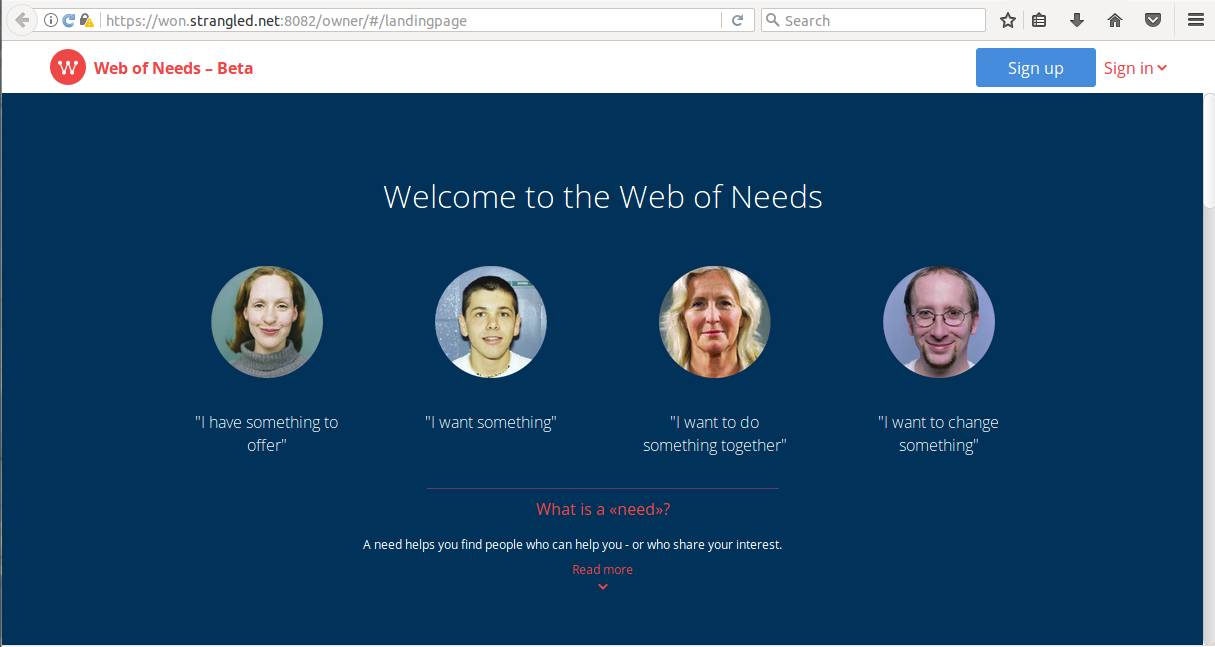
Web of Needs Welcome Screen
Sparql RDF file
Web of Needs Needs as RDF
Web of Needs Need as RDF
Web of Needs Need from the Browser
Web of Needs Index for RDF representation
 
Web of Needs debug bot

Nginx running on a different port to check the resolution of the domain name for the public IP

This is an error when dowloading won page with a self-signed cert:
https://gist.github.com/bshambaugh/10af5b37fa94a2796e5a63a9982541ab

Babble during installation:
What is this? matcher_rescal_1   | [INFO] [06/02/2017 20:44:17.076] [ClusterSystem-akka.actor.default-dispatcher-3] [akka://ClusterSystem/user/RescalMatcherActor] not enough tensor data available for execution yet, wait for next execution!
3:50
It looks like it repeats every minute
3:55
3:55
Sad:
bigdata_1          | WARN : BigdataRDFServlet.java:461: No writer for format: format=RDFa (mimeTypes=application/xhtml+xml, application/html, text/html; ext=xhtml, html), Accept="text/html,application/xhtml+xml,application/xml;q=0.9,/;q=0.8"
3:58
Question: Does won-docker need its own server cert, or does it  use the one created automatically by letsencrypt?++++++++++++++++++++
4:04
After confirming a security exception: https://won.strangled.net:8889/won/page/need/ resolves
4:05
(and it gives a Tomcat thumbnail icon)

(My guess is this security exception might be caused by a CN being set as strangled.net while the visited site was won.strangled.net ?  See this error: https://support.dnsimple.com/articles/what-is-common-name/ )

Notes for Experiments running Nginx in a Docker Container on Linode

Goal:

Get a Nginx Instance Running on Linode using a DNS alias:


(1) Get Nginx running.

Three ways to get Nginx on Docker:

Build it in with the Digital Ocean Tutorial (running Nginx on an Ubuntu Image):


https://www.digitalocean.com/community/tutorials/docker-explained-how-to-containerize-and-use-nginx-as-a-proxy


( & any Linode specific configuration??)

Pull a Docker image for Nginx from Docker Hub:
https://hub.docker.com/_/nginx/

Get the default Nginx page running:
sudo docker pull nginx
sudo docker run --name another-nginx -d -p 8040:80 nginx

Get a customized Nginx page running:sudo docker pull nginx
(does not need to be repeated, and the command below can be run concurrently)

Create index.html in /home/brent/Documents/dockerexperiments/nginx

docker run --name the-third -v /home/brent/Documents/dockerexperiments/nginx:/usr/share/nginx/html:ro -d -p 8030:80 nginx

or try a docker-compose script:
https://serversforhackers.com/getting-started-with-docker

Once you have an image built (or if you want to go back to what you have):

create index.html in /home/brent/share/
docker run -v /home/brent/share/:/var/www:rw -p 80:80 -d nginx-example

(2) Point it to a subdomain.
http://freedns.afraid.org/

Result of pulling from docker hub, getting the default Nginx running, and pointing the Public IP to a subdomain:


To do this locally with a particular file:

create index.html in /home/brent/share/
docker run -v /home/brent/share/:/var/www:rw -p 80:80 -d nginx-example

(check this:

docker run --name the-third -v /home/brent/Documents/dockerexperiments/nginx:/usr/share/nginx/html:ro -d -p 8030:80 nginx

I think it is to run an image from a container)


Thursday, June 1, 2017

Subdomains, Linode, another hosting provider for the parent domain, and a third party DNS provider ...and all that

Trying to point a subdomain at Linode, where the hosting provider is Bluehost and the DNS registrar is name.com

Common DNS Configurations (on Linode) by Elle Krout

https://www.linode.com/docs/networking/dns/common-dns-configurations

(see setting up a subdomain)
DNS Manager Overview (on Linode)

https://www.linode.com/docs/networking/dns/dns-manager-overview/

Interesting Links on Domain Registrar, Name.com

Adding a NS Record:

https://www.name.com/support/articles/115005091047-Adding-an-NS-Record?keyword=subdomain

Adding a domain to Bluehost:

https://bhusers.com/add-addon-domain-bluehost/

Hosting SubDomains on Bluehost:

https://my.bluehost.com/cgi/help/361

https://en.wikipedia.org/wiki/Zone_file

(set up subdomain on bluehost, and contact name.com to modify their zone file)

Then use NAT forwarding to point a docker container at the Public IP address for the hosting Linode Server

Understand Docker Communication - Docker Docs

https://docs.docker.com/engine/userguide/networking/default_network/container-communication/

How To Forward Ports through a Linux Gateway with Iptables by Justin Ellingwood

https://www.digitalocean.com/community/tutorials/how-to-forward-ports-through-a-linux-gateway-with-iptables

(useful tutorial for inspiration)

Linux 2.4 NAT HOWTO by Rusty Russel

http://www.netfilter.org/documentation/HOWTO/NAT-HOWTO.html

http://www.netfilter.org/documentation/HOWTO/packet-filtering-HOWTO.html

But using Bluehost and Linode for hosting and Name.com for parent DNS provision and Bluehost for subdomain provision adds a layer of complexity, What about https://freedns.afraid.org/ and Linode?